Backend Escalable con Contenedores
API containerizada con ECS Fargate + ALB + Auto Scaling que responde a picos de tráfico sin intervención manual.
Problema & Solución
Problema
Una API REST necesita manejar tráfico variable con picos impredecibles (ej: campañas de marketing, eventos). La solución debe escalar automáticamente en segundos, tener zero-downtime deploys, y los desarrolladores no deben gestionar servidores ni parches de SO.
Solución
Se containeriza la aplicación con Docker (imagen mínima node:20-alpine, multi-stage build). ECS Fargate ejecuta las tareas sin provisionar instancias EC2. Un Application Load Balancer distribuye el tráfico con health checks activos. Target Tracking Scaling en ECS ajusta el número de tareas basándose en CPU utilization (target: 60%). Rolling deployments garantizan zero-downtime. RDS PostgreSQL en subnet privada con Secrets Manager para credenciales.
Diagrama de Arquitectura
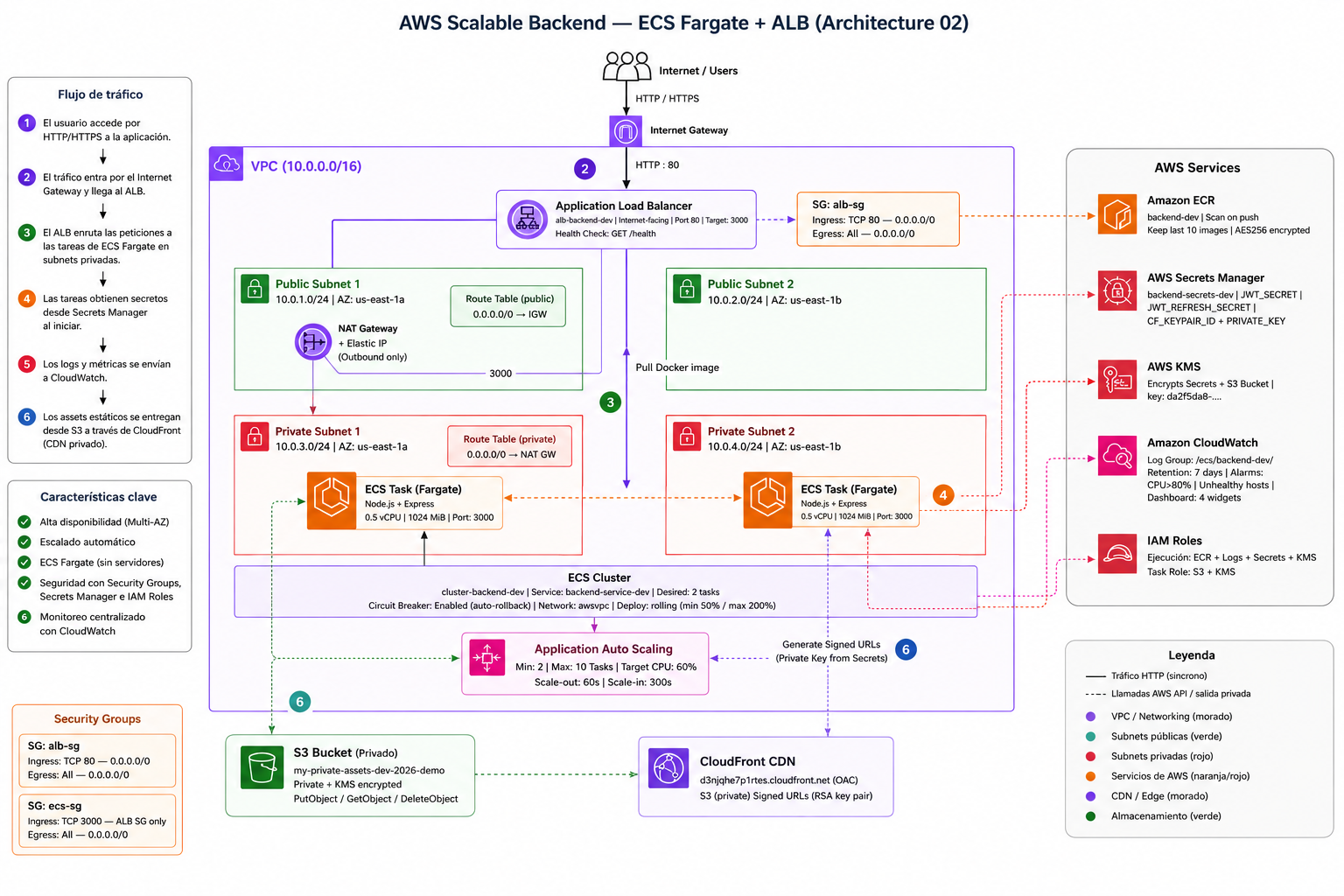
Cómo Funciona
Build y push de imagen Docker a ECR
GitHub Actions construye la imagen Docker con multi-stage build (builder → runner). La imagen final usa node:20-alpine (~150MB vs ~900MB de node:20). Se tagea con el SHA del commit para trazabilidad. Se pushea a ECR con docker/login-action usando OIDC (sin access keys hardcodeadas). ECR escanea la imagen con Amazon Inspector automáticamente.
ECS Rolling Deployment
ECS Service inicia nuevas tasks con la imagen actualizada. Deployment configuration: minimumHealthyPercent=50, maximumPercent=200. El ALB espera que las nuevas tasks pasen el health check (GET /health, 3 respuestas 200 OK consecutivas) antes de draining las antiguas. Circuit Breaker habilitado: si las nuevas tasks fallan dentro de una ventana de tiempo, ECS hace rollback automático a la versión anterior.
Request routing por el ALB
El ALB recibe el request HTTPS (certificado ACM). Termina TLS en el balanceador (TLS offloading). Distribuye vía round-robin entre las tasks registradas en el Target Group. Envía headers X-Forwarded-For y X-Forwarded-Proto para que la aplicación conozca la IP real del cliente.
Procesamiento en ECS Task (Fargate)
La task corre en una subnet privada (sin IP pública directa). El IAM Task Role le da permisos mínimos: GetSecretValue para credenciales DB, PutMetricData para métricas custom. Las credenciales DB se inyectan como environment variables desde Secrets Manager en el startup del container. El container logs a CloudWatch Logs via awslogs driver.
Auto Scaling basado en CPU
CloudWatch monitorea ECSServiceAverageCPUUtilization. Target Tracking Policy mantiene el target en 60%. Scale-out (agregar task): cuando CPU >60% por 1 minuto, cooldown 60s. Scale-in (remover task): cuando CPU <30% por 5 minutos, cooldown 300s (más conservador para evitar thrashing). Min: 1 task, Max: 10 tasks.
Conexión a RDS PostgreSQL
RDS en subnet privada, Security Group solo permite inbound 5432 desde el Security Group de las ECS tasks. La aplicación usa connection pooling (pg-pool, max 10 connections por task). Para 10 tasks → 100 conexiones máximas al RDS. Si se superan, se puede agregar RDS Proxy para pooling a nivel infraestructura.
Servicios AWS
ECS Fargate
Orquestación serverless de containers
Task: 0.5 vCPU, 1GB RAM. awsvpc networking mode (ENI por task). IAM Task Role con permisos mínimos.
Application Load Balancer
Distribución de tráfico L7
Listener HTTPS:443 con certificado ACM. Health Check: GET /health cada 30s. Deregistration delay: 30s.
Amazon ECR
Registro privado de imágenes Docker
Lifecycle policy: retener últimas 10 imágenes tagged, eliminar untagged >7 días. Image scanning on push.
Application Auto Scaling
Escala las ECS tasks automáticamente
Target Tracking: CPU 60%. Scale-out cooldown 60s, scale-in 300s. Min 1 task, Max 10 tasks.
RDS PostgreSQL
Base de datos relacional administrada
db.t3.medium, Multi-AZ para HA. Automated backups 7 días. KMS encryption. Sin endpoint público.
AWS Secrets Manager
Credenciales de base de datos
DATABASE_URL se inyecta en el container via secretsFrom en el Task Definition. Rotación automática con Lambda.
CloudWatch Logs + Metrics
Observabilidad centralizada
Log group /ecs/portfolio-api, retención 30 días. Métricas custom: requests/s, latencia p95/p99, errores.
Decisiones Técnicas (Trade-offs)
ECS Fargate vs ECS con EC2 vs EC2 directo
Elegido
ECS Fargate
Alternativas
- —ECS EC2 — más barato a alta utilización sostenida, pero requiere gestionar instancias
- —EC2 directo + systemd — máximo control, máximo overhead operativo
- —AWS App Runner — más simple pero menos control sobre networking y scaling
Razón
Fargate elimina la gestión de instancias EC2 (parches, capacity planning, AMIs). El overhead de costo (~30% más caro por unidad de cómputo) se justifica por el ahorro operativo. Para cargas sostenidas >80% utilización durante 24/7, EC2 Reserved Instances serían más rentables.
RDS PostgreSQL vs Aurora Serverless
Elegido
RDS PostgreSQL (provisioned)
Alternativas
- —Aurora PostgreSQL Provisioned — más performance, más costo
- —Aurora Serverless v2 — escala a 0 en inactividad, tiene cold starts
- —DynamoDB — si el modelo de datos lo permite, mejor escalabilidad
Razón
Aurora Serverless v2 tiene cold start de ~5s que impacta las primeras requests después de un período de inactividad. Para una API que necesita respuesta consistente, RDS provisioned con Multi-AZ da latencia predecible. Aurora se recomendaría para cargas con patrones muy variables (ej: uso solo en horario laboral).
Rolling Deployment vs Blue/Green
Elegido
Rolling Deployment con Circuit Breaker
Alternativas
- —Blue/Green (CodeDeploy) — rollback instantáneo, requiere infraestructura duplicada
- —Canary — gradual, detecta issues antes del full rollout
Razón
Rolling deployment es suficiente para la mayoría de casos y no requiere infraestructura duplicada. El Circuit Breaker de ECS hace rollback automático si las nuevas tasks fallan. Blue/Green (vía CodeDeploy) añade complejidad y costo, pero es obligatorio cuando se necesita rollback instantáneo sin downtime en caso de bugs en producción.
Seguridad
- ✓ECS Tasks en subnets privadas: sin IP pública, solo accesibles via ALB en subnet pública.
- ✓Security Groups con least privilege: ALB SG permite 443 desde Internet; ECS SG solo permite 3000 desde ALB SG; RDS SG solo permite 5432 desde ECS SG.
- ✓IAM Task Role con permisos mínimos: solo secretsmanager:GetSecretValue y cloudwatch:PutMetricData.
- ✓Credenciales DB via Secrets Manager secretsFrom, nunca como variables de entorno en texto plano.
- ✓RDS sin endpoint público: solo accesible desde la VPC.
- ✓ECR image scanning on push con Amazon Inspector. Vulnerabilidades críticas bloquean el deploy en GitHub Actions.
- ✓TLS offloading en ALB con certificado ACM (gratuito, auto-renovable). HSTS headers.
- ✓VPC Flow Logs habilitados para auditoría de tráfico de red.
Escalabilidad
- ↑Target Tracking Scaling: ajuste automático en ~60-90 segundos ante cambios de carga.
- ↑Rolling deploys: sin downtime durante actualizaciones, sin reducción de capacidad.
- ↑ALB soporta hasta 100,000 requests/segundo sin configuración adicional.
- ↑Connection pooling en la app (max 10 conn/task): para 10 tasks → 100 conexiones a RDS.
- ↑RDS Proxy como siguiente paso si se supera el límite de conexiones de RDS.
- ↑Multi-AZ en RDS: failover automático <60 segundos si la instancia principal falla.
- ↑Horizontal scaling limitado por RDS. Para escala masiva: read replicas o migrar a Aurora.
Estimación de Costos
| Servicio / Concepto | Estimado |
|---|---|
| ECS Fargate (0.5 vCPU, 1GB) | $0.02024/hora/task |
| ALB | $0.008/hora + $0.008/LCU-hora |
| RDS db.t3.medium (Single-AZ) | $0.068/hora |
| ECR Storage | $0.10/GB/mes |
| CloudWatch Logs | $0.50/GB ingested |
| Secrets Manager | $0.40/secreto/mes |
Snippets de Código
# ── Stage 1: instalar dependencias de producción ──────────────────────────
FROM node:22-slim AS deps

RUN corepack enable

WORKDIR /app

COPY package.json pnpm-lock.yaml pnpm-workspace.yaml ./

# sharp descarga binarios precompilados para linux/x64 automáticamente
RUN pnpm install --frozen-lockfile --prod

# ── Stage 2: imagen final mínima ──────────────────────────────────────────
FROM node:22-slim

RUN groupadd -r app && useradd -r -g app app

WORKDIR /app

COPY --from=deps /app/node_modules ./node_modules
COPY src/            ./src/
COPY config.js       ./
COPY package.json    ./

USER app

EXPOSE 3000

HEALTHCHECK --interval=30s --timeout=5s --start-period=15s --retries=3   CMD node -e "require('http').get('http://localhost:3000/health',r=>process.exit(r.statusCode===200?0:1)).on('error',()=>process.exit(1))"

CMD ["node", "src/server.js"]
terraform {
  required_providers {
    aws = {
      source  = "hashicorp/aws"
      version = "6.45.0"
    }
  }

  required_version = ">= 1.4.0"
}

provider "aws" {
  region  = "us-east-1"
  profile = "leader-developer-personal"
}

#################################################
# VARIABLES
#################################################

variable "env" {
  type = string
}

variable "app_image" {
  type        = string
  description = "URI de imagen ECR: 123456789.dkr.ecr.us-east-1.amazonaws.com/backend-dev:latest"
}

variable "app_port" {
  type    = number
  default = 3000
}

variable "cors_origin" {
  type        = string
  description = "URL del frontend permitido en CORS (ej: https://tuapp.com)"
}

variable "aws_bucket_name" {
  type        = string
  description = "Nombre del bucket S3 de la Arquitectura 01 (CDN)"
}

variable "cloudfront_domain" {
  type        = string
  description = "Dominio CloudFront de la Arquitectura 01 (ej: https://xxxx.cloudfront.net)"
}

variable "cloudfront_keypair_id" {
  type        = string
  description = "ID del key pair de CloudFront (APKA...)"
}

variable "cloudfront_private_key" {
  type        = string
  sensitive   = true
  description = "Contenido PEM de la private key de CloudFront"
}

variable "jwt_secret" {
  type      = string
  sensitive = true
}

variable "jwt_refresh_secret" {
  type      = string
  sensitive = true
}

variable "cpu_scaling_target" {
  type    = number
  default = 60
}

#################################################
# DATA SOURCES
#################################################

data "aws_caller_identity" "current" {}

data "aws_region" "current" {}

data "aws_availability_zones" "available" {
  state = "available"
}

data "aws_s3_bucket" "assets" {
  bucket = var.aws_bucket_name
}

#################################################
# VPC
#################################################

resource "aws_vpc" "main" {
  cidr_block           = "10.0.0.0/16"
  enable_dns_hostnames = true
  enable_dns_support   = true

  tags = { Name = "vpc-backend-${var.env}" }
}

resource "aws_internet_gateway" "main" {
  vpc_id = aws_vpc.main.id

  tags = { Name = "igw-backend-${var.env}" }
}

resource "aws_subnet" "public" {
  count             = 2
  vpc_id            = aws_vpc.main.id
  cidr_block        = "10.0.${count.index + 1}.0/24"
  availability_zone = data.aws_availability_zones.available.names[count.index]

  tags = { Name = "subnet-public-${count.index + 1}-${var.env}" }
}

resource "aws_subnet" "private" {
  count             = 2
  vpc_id            = aws_vpc.main.id
  cidr_block        = "10.0.${count.index + 3}.0/24"
  availability_zone = data.aws_availability_zones.available.names[count.index]

  tags = { Name = "subnet-private-${count.index + 1}-${var.env}" }
}

resource "aws_eip" "nat" {
  domain = "vpc"

  tags = { Name = "eip-nat-${var.env}" }
}

resource "aws_nat_gateway" "main" {
  allocation_id = aws_eip.nat.id
  subnet_id     = aws_subnet.public[0].id

  depends_on = [aws_internet_gateway.main]

  tags = { Name = "nat-backend-${var.env}" }
}

resource "aws_route_table" "public" {
  vpc_id = aws_vpc.main.id

  route {
    cidr_block = "0.0.0.0/0"
    gateway_id = aws_internet_gateway.main.id
  }

  tags = { Name = "rt-public-${var.env}" }
}

resource "aws_route_table_association" "public" {
  count          = 2
  subnet_id      = aws_subnet.public[count.index].id
  route_table_id = aws_route_table.public.id
}

resource "aws_route_table" "private" {
  vpc_id = aws_vpc.main.id

  route {
    cidr_block     = "0.0.0.0/0"
    nat_gateway_id = aws_nat_gateway.main.id
  }

  tags = { Name = "rt-private-${var.env}" }
}

resource "aws_route_table_association" "private" {
  count          = 2
  subnet_id      = aws_subnet.private[count.index].id
  route_table_id = aws_route_table.private.id
}

#################################################
# SECURITY GROUPS
#################################################

resource "aws_security_group" "alb" {
  name        = "alb-sg-${var.env}"
  description = "ALB: HTTP desde internet"
  vpc_id      = aws_vpc.main.id

  ingress {
    from_port   = 80
    to_port     = 80
    protocol    = "tcp"
    cidr_blocks = ["0.0.0.0/0"]
  }

  egress {
    from_port   = 0
    to_port     = 0
    protocol    = "-1"
    cidr_blocks = ["0.0.0.0/0"]
  }

  tags = { Name = "alb-sg-${var.env}" }
}

resource "aws_security_group" "ecs" {
  name        = "ecs-sg-${var.env}"
  description = "ECS tasks: traffic only from ALB"
  vpc_id      = aws_vpc.main.id

  ingress {
    from_port       = var.app_port
    to_port         = var.app_port
    protocol        = "tcp"
    security_groups = [aws_security_group.alb.id]
  }

  egress {
    from_port   = 0
    to_port     = 0
    protocol    = "-1"
    cidr_blocks = ["0.0.0.0/0"]
  }

  tags = { Name = "ecs-sg-${var.env}" }
}

#################################################
# ECR
#################################################

resource "aws_ecr_repository" "backend" {
  name                 = "backend-${var.env}"
  image_tag_mutability = "MUTABLE"

  image_scanning_configuration {
    scan_on_push = true
  }

  encryption_configuration {
    encryption_type = "AES256"
  }
}

resource "aws_ecr_lifecycle_policy" "backend" {
  repository = aws_ecr_repository.backend.name

  policy = jsonencode({
    rules = [{
      rulePriority = 1
      description  = "Mantener últimas 10 imágenes"
      selection = {
        tagStatus   = "any"
        countType   = "imageCountMoreThan"
        countNumber = 10
      }
      action = { type = "expire" }
    }]
  })
}

#################################################
# SECRETS MANAGER
#################################################

resource "aws_secretsmanager_secret" "app" {
  name                    = "backend-secrets-${var.env}"
  description             = "JWT secrets y CloudFront private key del backend"
  recovery_window_in_days = 0
}

resource "aws_secretsmanager_secret_version" "app" {
  secret_id = aws_secretsmanager_secret.app.id

  secret_string = jsonencode({
    JWT_SECRET             = var.jwt_secret
    JWT_REFRESH_SECRET     = var.jwt_refresh_secret
    CLOUDFRONT_KEYPAIR_ID  = var.cloudfront_keypair_id
    CLOUDFRONT_PRIVATE_KEY = var.cloudfront_private_key
  })
}

#################################################
# IAM — Execution Role
#################################################

resource "aws_iam_role" "ecs_execution" {
  name = "ecs-execution-role-backend-${var.env}"

  assume_role_policy = jsonencode({
    Version = "2012-10-17"
    Statement = [{
      Effect    = "Allow"
      Principal = { Service = "ecs-tasks.amazonaws.com" }
      Action    = "sts:AssumeRole"
    }]
  })
}

resource "aws_iam_role_policy_attachment" "ecs_execution_managed" {
  role       = aws_iam_role.ecs_execution.name
  policy_arn = "arn:aws:iam::aws:policy/service-role/AmazonECSTaskExecutionRolePolicy"
}

resource "aws_iam_role_policy" "ecs_execution_secrets" {
  name = "ecs-secrets-access-${var.env}"
  role = aws_iam_role.ecs_execution.id

  policy = jsonencode({
    Version = "2012-10-17"
    Statement = [
      {
        Effect   = "Allow"
        Action   = ["secretsmanager:GetSecretValue"]
        Resource = aws_secretsmanager_secret.app.arn
      },
      {
        Effect   = "Allow"
        Action   = ["kms:GenerateDataKey", "kms:Decrypt", "kms:DescribeKey"]
        Resource = "arn:aws:kms:us-east-1:578209355877:key/da2f5da6-2e70-40a0-88f1-e49baf700989"
      }
    ]
  })
}

#################################################
# IAM — Task Role
#################################################

resource "aws_iam_role" "ecs_task" {
  name = "ecs-task-role-backend-${var.env}"

  assume_role_policy = jsonencode({
    Version = "2012-10-17"
    Statement = [{
      Effect    = "Allow"
      Principal = { Service = "ecs-tasks.amazonaws.com" }
      Action    = "sts:AssumeRole"
    }]
  })
}

resource "aws_iam_role_policy" "ecs_task_s3" {
  name = "ecs-task-s3-${var.env}"
  role = aws_iam_role.ecs_task.id

  policy = jsonencode({
    Version = "2012-10-17"
    Statement = [
      {
        Effect   = "Allow"
        Action   = ["s3:PutObject", "s3:GetObject", "s3:DeleteObject"]
        Resource = "${data.aws_s3_bucket.assets.arn}/*"
      },
      {
        Effect   = "Allow"
        Action   = ["s3:ListBucket"]
        Resource = data.aws_s3_bucket.assets.arn
      },
      {
        Effect   = "Allow"
        Action   = ["kms:GenerateDataKey", "kms:Decrypt", "kms:DescribeKey"]
        Resource = "arn:aws:kms:us-east-1:578209355877:key/da2f5da6-2e70-40a0-88f1-e49baf700989"
      }
    ]
  })
}

#################################################
# CLOUDWATCH — Log Group
#################################################

resource "aws_cloudwatch_log_group" "ecs" {
  name              = "/ecs/backend-${var.env}"
  retention_in_days = 7
}

#################################################
# ECS CLUSTER
#################################################

resource "aws_ecs_cluster" "main" {
  name = "cluster-backend-${var.env}"

  configuration {
    execute_command_configuration {
      logging = "OVERRIDE"
      log_configuration {
        cloud_watch_log_group_name = aws_cloudwatch_log_group.ecs.name
      }
    }
  }

  setting {
    name  = "containerInsights"
    value = "enabled"
  }
}

#################################################
# ECS TASK DEFINITION
#################################################

resource "aws_ecs_task_definition" "backend" {
  family                   = "backend-${var.env}"
  network_mode             = "awsvpc"
  requires_compatibilities = ["FARGATE"]
  cpu                      = "512"
  memory                   = "1024"
  execution_role_arn       = aws_iam_role.ecs_execution.arn
  task_role_arn            = aws_iam_role.ecs_task.arn

  container_definitions = jsonencode([{
    name  = "backend"
    image = var.app_image

    portMappings = [{
      containerPort = var.app_port
      protocol      = "tcp"
    }]

    secrets = [
      { name = "JWT_SECRET",             valueFrom = "${aws_secretsmanager_secret.app.arn}:JWT_SECRET::" },
      { name = "JWT_REFRESH_SECRET",     valueFrom = "${aws_secretsmanager_secret.app.arn}:JWT_REFRESH_SECRET::" },
      { name = "CLOUDFRONT_KEYPAIR_ID",  valueFrom = "${aws_secretsmanager_secret.app.arn}:CLOUDFRONT_KEYPAIR_ID::" },
      { name = "CLOUDFRONT_PRIVATE_KEY", valueFrom = "${aws_secretsmanager_secret.app.arn}:CLOUDFRONT_PRIVATE_KEY::" },
    ]

    environment = [
      { name = "NODE_ENV",               value = "production" },
      { name = "PORT",                   value = tostring(var.app_port) },
      { name = "API_PREFIX",             value = "/api/v1" },
      { name = "CORS_ORIGIN",            value = var.cors_origin },
      { name = "AWS_REGION",             value = data.aws_region.current.name },
      { name = "AWS_BUCKET_NAME",        value = var.aws_bucket_name },
      { name = "CLOUDFRONT_DOMAIN",      value = var.cloudfront_domain },
      { name = "RATE_LIMIT_WINDOW_MS",   value = "900000" },
      { name = "RATE_LIMIT_MAX",         value = "100" },
      { name = "LOG_LEVEL",              value = "combined" },
    ]

    logConfiguration = {
      logDriver = "awslogs"
      options = {
        "awslogs-group"         = aws_cloudwatch_log_group.ecs.name
        "awslogs-region"        = data.aws_region.current.name
        "awslogs-stream-prefix" = "backend"
      }
    }

    healthCheck = {
      command     = ["CMD-SHELL", "node -e "require('http').get('http://localhost:${var.app_port}/health',r=>process.exit(r.statusCode===200?0:1)).on('error',()=>process.exit(1))""]
      interval    = 30
      timeout     = 5
      retries     = 3
      startPeriod = 60
    }
  }])
}

#################################################
# APPLICATION LOAD BALANCER
#################################################

resource "aws_lb" "main" {
  name               = "alb-backend-${var.env}"
  internal           = false
  load_balancer_type = "application"
  security_groups    = [aws_security_group.alb.id]
  subnets            = aws_subnet.public[*].id

  enable_deletion_protection = false

  tags = { Name = "alb-backend-${var.env}" }
}

resource "aws_lb_target_group" "backend" {
  name        = "tg-backend-${var.env}"
  port        = var.app_port
  protocol    = "HTTP"
  vpc_id      = aws_vpc.main.id
  target_type = "ip"

  health_check {
    path                = "/health"
    interval            = 30
    timeout             = 5
    healthy_threshold   = 2
    unhealthy_threshold = 3
    matcher             = "200"
  }

  deregistration_delay = 30

  tags = { Name = "tg-backend-${var.env}" }
}

resource "aws_lb_listener" "http" {
  load_balancer_arn = aws_lb.main.arn
  port              = 80
  protocol          = "HTTP"

  default_action {
    type             = "forward"
    target_group_arn = aws_lb_target_group.backend.arn
  }
}

#################################################
# ECS SERVICE
#################################################

resource "aws_ecs_service" "backend" {
  name            = "backend-service-${var.env}"
  cluster         = aws_ecs_cluster.main.id
  task_definition = aws_ecs_task_definition.backend.arn
  desired_count   = 2
  launch_type     = "FARGATE"

  network_configuration {
    subnets          = aws_subnet.private[*].id
    security_groups  = [aws_security_group.ecs.id]
    assign_public_ip = false
  }

  load_balancer {
    target_group_arn = aws_lb_target_group.backend.arn
    container_name   = "backend"
    container_port   = var.app_port
  }

  deployment_minimum_healthy_percent = 50
  deployment_maximum_percent         = 200

  deployment_circuit_breaker {
    enable   = true
    rollback = true
  }

  depends_on = [aws_lb_listener.http]

  lifecycle {
    ignore_changes = [task_definition, desired_count]
  }
}

#################################################
# AUTO SCALING
#################################################

resource "aws_appautoscaling_target" "ecs" {
  max_capacity       = 10
  min_capacity       = 2
  resource_id        = "service/${aws_ecs_cluster.main.name}/${aws_ecs_service.backend.name}"
  scalable_dimension = "ecs:service:DesiredCount"
  service_namespace  = "ecs"
}

resource "aws_appautoscaling_policy" "cpu" {
  name               = "cpu-tracking-backend-${var.env}"
  policy_type        = "TargetTrackingScaling"
  resource_id        = aws_appautoscaling_target.ecs.resource_id
  scalable_dimension = aws_appautoscaling_target.ecs.scalable_dimension
  service_namespace  = aws_appautoscaling_target.ecs.service_namespace

  target_tracking_scaling_policy_configuration {
    predefined_metric_specification {
      predefined_metric_type = "ECSServiceAverageCPUUtilization"
    }
    target_value       = var.cpu_scaling_target
    scale_out_cooldown = 60
    scale_in_cooldown  = 300
  }
}

#################################################
# CLOUDWATCH — Alarmas
#################################################

resource "aws_cloudwatch_metric_alarm" "cpu_high" {
  alarm_name          = "ecs-cpu-high-backend-${var.env}"
  comparison_operator = "GreaterThanThreshold"
  evaluation_periods  = 2
  metric_name         = "CPUUtilization"
  namespace           = "AWS/ECS"
  period              = 60
  statistic           = "Average"
  threshold           = 80
  alarm_description   = "CPU del backend > 80% por 2 minutos"

  dimensions = {
    ClusterName = aws_ecs_cluster.main.name
    ServiceName = aws_ecs_service.backend.name
  }
}

resource "aws_cloudwatch_metric_alarm" "unhealthy_hosts" {
  alarm_name          = "alb-unhealthy-hosts-backend-${var.env}"
  comparison_operator = "GreaterThanThreshold"
  evaluation_periods  = 1
  metric_name         = "UnHealthyHostCount"
  namespace           = "AWS/ApplicationELB"
  period              = 60
  statistic           = "Average"
  threshold           = 0
  alarm_description   = "Hay containers no saludables detrás del ALB"

  dimensions = {
    LoadBalancer = aws_lb.main.arn_suffix
    TargetGroup  = aws_lb_target_group.backend.arn_suffix
  }
}

#################################################
# CLOUDWATCH — Dashboard
#################################################

resource "aws_cloudwatch_dashboard" "main" {
  dashboard_name = "backend-${var.env}"

  dashboard_body = jsonencode({
    widgets = [
      {
        type = "metric" x = 0  y = 0  width = 12 height = 6
        properties = {
          region  = "us-east-1"
          title   = "ECS CPU Utilization (%)"
          period  = 60
          stat    = "Average"
          view    = "timeSeries"
          metrics = [["AWS/ECS", "CPUUtilization", "ClusterName", aws_ecs_cluster.main.name, "ServiceName", aws_ecs_service.backend.name]]
        }
      },
      {
        type = "metric" x = 12 y = 0  width = 12 height = 6
        properties = {
          region  = "us-east-1"
          title   = "ECS Memory Utilization (%)"
          period  = 60
          stat    = "Average"
          view    = "timeSeries"
          metrics = [["AWS/ECS", "MemoryUtilization", "ClusterName", aws_ecs_cluster.main.name, "ServiceName", aws_ecs_service.backend.name]]
        }
      },
      {
        type = "metric" x = 0  y = 6  width = 12 height = 6
        properties = {
          region  = "us-east-1"
          title   = "ALB Request Count"
          period  = 60
          stat    = "Sum"
          view    = "timeSeries"
          metrics = [["AWS/ApplicationELB", "RequestCount", "LoadBalancer", aws_lb.main.arn_suffix]]
        }
      },
      {
        type = "metric" x = 12 y = 6  width = 12 height = 6
        properties = {
          region  = "us-east-1"
          title   = "ALB Target Response Time (s)"
          period  = 60
          stat    = "Average"
          view    = "timeSeries"
          metrics = [["AWS/ApplicationELB", "TargetResponseTime", "LoadBalancer", aws_lb.main.arn_suffix]]
        }
      }
    ]
  })
}

#################################################
# OUTPUTS
#################################################

output "api_endpoint" {
  description = "Endpoint público del backend"
  value       = "http://${aws_lb.main.dns_name}"
}

output "ecr_repository_url" {
  description = "URL del repositorio ECR para push de imágenes"
  value       = aws_ecr_repository.backend.repository_url
}

output "ecs_cluster_name" {
  value = aws_ecs_cluster.main.name
}

output "ecs_service_name" {
  value = aws_ecs_service.backend.name
}

output "cloudwatch_dashboard_url" {
  value = "https://console.aws.amazon.com/cloudwatch/home?region=${data.aws_region.current.name}#dashboards:name=${aws_cloudwatch_dashboard.main.dashboard_name}"
}